Heylolly Font Review: A Playful Display Font for Small Business Branding
Last month, I sat down at my kitchen table with a fresh batch of product labels for my handmade candle line. I had spent weeks perfecting the scents—cedar and vanilla, lavender and honey—but when I printed a test label with my usual go-to font, something felt off. The name of each candle looked flat, generic, and entirely forgettable. That is the moment I remembered a font I had bookmarked months earlier: Heylolly. I pulled it up, typed in “Cedar & Vanilla,” and immediately saw the difference. The letters had personality. They felt warm, approachable, and exactly like the kind of brand I wanted to build. That one change transformed my packaging from something that blended in to something that stopped people mid-scroll.
What Makes Heylolly Stand Out as a Display Font
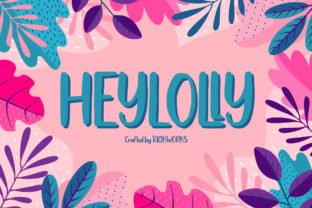
Heylolly is a cute display font that feels handcrafted in the best way. It carries a casual charm that makes it wonderfully down-to-earth, yet it does not sacrifice readability. As a small business owner who has tested dozens of fonts over the years, I can tell you that finding that balance is rare. Many display fonts lean too far into decoration, becoming illegible at small sizes or on busy backgrounds. Heylolly avoids that trap. Its letterforms are clear and friendly, with just enough whimsy to feel special without overwhelming your message.
This font lives in that sweet spot between playful and professional. It works beautifully for headlines, product names, and short phrases that need to make an impression. The visual character of Heylolly is approachable—it feels like a font that would smile at you if it could. For a small business, that kind of warmth translates directly into how customers perceive your brand. When someone picks up a candle jar or opens a bakery box, the typography is often the first thing they notice, even if they do not realize it. Heylolly makes that first impression count.
Testing Heylolly on Real Business Materials
I decided to put Heylolly through a full brand upgrade test across several customer-facing materials. Here is what I learned about how it performs in real-world scenarios.
Product Labels and Packaging Design
For my candle labels, I used Heylolly for the scent names and the brand tagline. At a label size of about two inches by three inches, the font remained perfectly readable. The casual letterforms added a handmade feel that matched the artisanal nature of my products. I also tested it on a small skincare line a friend runs—she used Heylolly for the product titles on her moisturizer jars. The font gave her packaging a boutique look without needing expensive design elements. If you sell handmade goods, Heylolly can elevate your labels from homemade to handcrafted with care.
Thank-You Cards and Stickers
One of the easiest ways to build customer loyalty is through small touches like thank-you cards or free stickers with orders. I printed a batch of thank-you cards using Heylolly for the greeting and my brand name. The font made the cards feel personal, like a note from a friend rather than a corporate insert. I also created a few sticker designs with Heylolly for product names and short phrases like “hand poured with love.” The stickers looked cohesive and intentional, which helped my brand feel more polished overall.
Menus and Flyers
A local café owner I know was refreshing her menu board and wanted something that felt cozy and inviting. She tried Heylolly for the drink categories and featured items. The font worked especially well on chalk-style signage and printed takeaway menus. Customers commented that the menu felt easier to read and more welcoming. For small businesses like cafés, bakeries, or juice bars, Heylolly can bring a friendly energy to your menu typography without looking childish.
Social Media Graphics and Online Shop Banners
Digital use is where Heylolly really shines. I updated my Instagram templates to feature Heylolly for product announcements and sale graphics. The font reads well on mobile screens, which is critical because most of your customers will see your content on their phones first. I also used it for my online shop banner on Etsy. The banner text—my shop name and a short tagline—felt more memorable and distinct. Social media is crowded, and a unique font like Heylolly helps your graphics stand out in a feed full of generic typography.
How Heylolly Helps Small Businesses Look Professional and Consistent
Typography is one of the most underrated tools for building brand identity. When you use the same font consistently across your labels, packaging, website, and social media, customers start to recognize you before they even read your name. Heylolly can serve as that anchor for your brand. Because it is a display font, it is best used for headlines, logos, product titles, and short display text rather than long paragraphs. For body copy or detailed product descriptions, you will want a clean sans serif font to pair with it.
For example, I paired Heylolly with a simple sans serif for my ingredient lists and care instructions on candle labels. The contrast between the playful display font and the neutral body font created a balanced, professional look. Customers perceived my brand as more trustworthy and deliberate. When your packaging looks intentional, people assume your product is high quality too. That is the power of good typography—it communicates care before a single word is read.
Readability Advice for Small Labels and Mobile Screens
One concern I hear from other business owners is whether a display font like Heylolly will work on small surfaces or mobile devices. Based on my testing, Heylolly holds up well at moderate sizes. For tiny labels under one inch, I would recommend using it sparingly—perhaps for the brand name only. On mobile screens, the font remains readable for short headlines and product names, but avoid using it for detailed information like prices or descriptions. That is where your pairing font should take over.
If you are designing for print, always do a test print before ordering in bulk. Check how the font looks on your actual packaging material—kraft paper, glossy labels, or glass jars can affect readability. For digital use, preview your graphics on an actual phone screen to ensure the text is clear at thumbnail size. Heylolly is forgiving in this regard because its letterforms are open and friendly, but a quick test save you from costly design mistakes.
Simple Font Pairing Ideas with Heylolly
Pairing Heylolly with a clean sans serif is my favorite approach for product labels and packaging. A font like Montserrat, Lato, or Open Sans works well because the contrast between the playful display font and the neutral body font creates visual interest without competing. If your brand leans more elegant, you can pair Heylolly with a light serif like Cormorant Garamond for a sophisticated look. For a more casual or handmade vibe, try a simple handwritten font for supporting text, but keep it subtle so the pairing does not become chaotic.
For logos and hero text, Heylolly can stand alone beautifully. I use it for my brand name on the front of labels and then switch to a sans serif for the back label details. This approach keeps the front clean and memorable while the back remains functional and easy to read. The key is to let Heylolly be the star of your display typography and let your secondary font handle the heavy lifting.
What to Check Before Using Heylolly Commercially
Before you download Heylolly and start printing labels or building your website, take a moment to review the included styles and licensing. Check whether the font package includes ligatures, alternates, or multiple weights—these extras can give you more flexibility in your designs. Also confirm the file formats available; you will want formats that work with your design software, whether that is a desktop application or a web-based tool.
If you plan to use Heylolly on products, packaging, merchandise, or digital templates for client work, you need to verify the commercial font licensing terms. Many fonts require an extended license for commercial use, especially if you are selling products with the font on the packaging. The same applies if you are creating templates for sale or using the font in client branding projects. Always read the license agreement carefully so you can use Heylolly confidently and legally in your business.
Multilingual support is another consideration. If your brand serves customers in multiple languages, check whether Heylolly includes the characters you need. Some display fonts have limited character sets, so confirming this early will save you from surprises later. Taking these steps ensures that your brand upgrade goes smoothly and that Heylolly becomes a reliable asset in your design toolkit.
Heylolly has become a favorite in my brand kit, and I find myself reaching for it whenever I need to add warmth and personality to a project. Whether you are refreshing your product labels, designing a new menu, or building a consistent look across your social media, this font delivers charm without sacrificing readability. It is the kind of typeface that makes your business feel more like you—and that is something customers notice.